Lijsten 122 Custom Screensaver Mac Gratis
Lijsten 122 Custom Screensaver Mac Gratis. Yes the screensaver will run like normal in the background and your mac can perform as if it's a normal background image. You still see all the preferences in the show all menu and the system preferences menu accessed from the dock. You can customize the layout of the system preferences window by choosing view→customize. 15.07.2019 · if you want to make your own custom screensaver for mac os x, this article is for you. Clear the check box next to the items you don't want to see.

Uitgelicht How To Make Custom Wallpaper On Your Macbook How To Customize Your Macbook Youtube
You can customize the layout of the system preferences window by choosing view→customize. 30.07.2021 · customize your mac screensaver with these tips. Iscreensaver designer 4, magic desktop 1. 5 click the close button in the desktop & screen saver preferences pane. Macs are some of the most aesthetically pleasing computers out there, and having your screensaver will only add to that.30.07.2021 · customize your mac screensaver with these tips.
5 click the close button in the desktop & screen saver preferences pane. We'll walk through a tutorial for making a screensaver which … Setting one of these takes. 30.07.2021 · customize your mac screensaver with these tips. Clear the check box next to the items you don't want to see. Yes the screensaver will run like normal in the background and your mac can perform as if it's a normal background image.
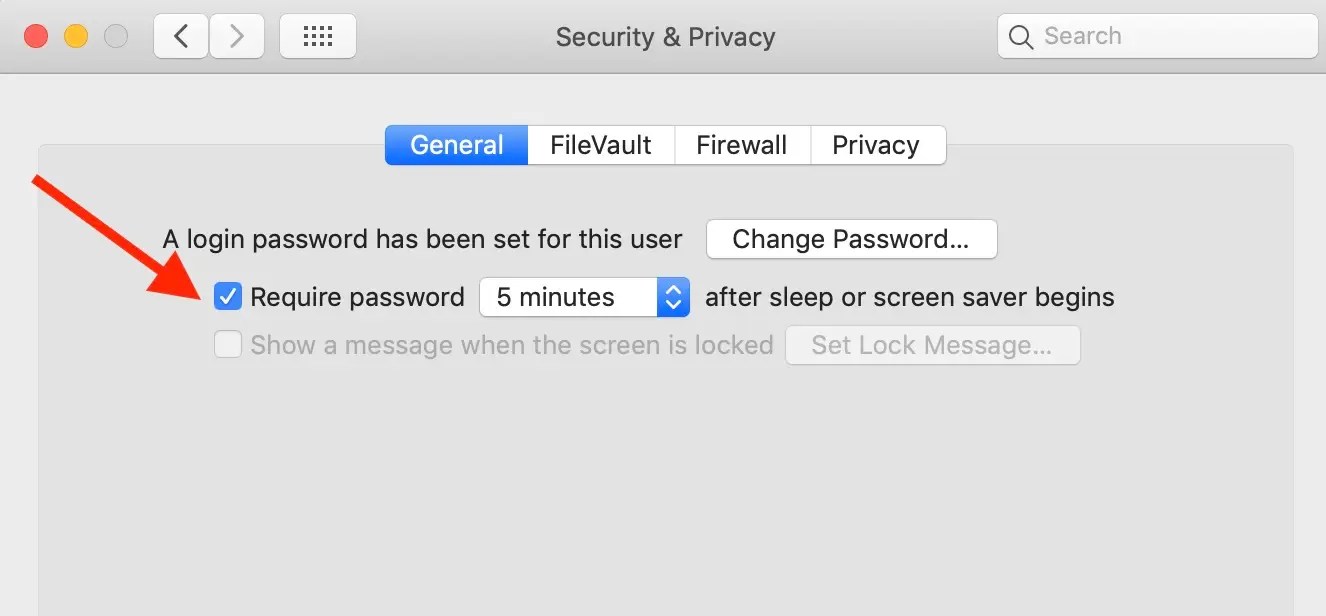
Iscreensaver designer 4, magic desktop 1... We'll walk through a tutorial for making a screensaver which … In this tutorial i will show you how to not only create your own screensaver but how to set your screensaver as your desktop background. Setting one of these takes.

30.07.2021 · customize your mac screensaver with these tips. Macs are some of the most aesthetically pleasing computers out there, and having your screensaver will only add to that. Setting one of these takes. You still see all the preferences in the show all menu and the system preferences menu accessed from the dock. 15.07.2019 · if you want to make your own custom screensaver for mac os x, this article is for you. Yes the screensaver will run like normal in the background and your mac can perform as if it's a normal background image. 5 click the close button in the desktop & screen saver preferences pane. You can customize the layout of the system preferences window by choosing view→customize. We'll walk through a tutorial for making a screensaver which … In this tutorial i will show you how to not only create your own screensaver but how to set your screensaver as your desktop background.. You still see all the preferences in the show all menu and the system preferences menu accessed from the dock.

Macs are some of the most aesthetically pleasing computers out there, and having your screensaver will only add to that. Clear the check box next to the items you don't want to see.. Yes the screensaver will run like normal in the background and your mac can perform as if it's a normal background image.

You can customize the layout of the system preferences window by choosing view→customize. Iscreensaver designer 4, magic desktop 1. Clear the check box next to the items you don't want to see. You still see all the preferences in the show all menu and the system preferences menu accessed from the dock. Yes the screensaver will run like normal in the background and your mac can perform as if it's a normal background image. Setting one of these takes. In this tutorial i will show you how to not only create your own screensaver but how to set your screensaver as your desktop background. Macs are some of the most aesthetically pleasing computers out there, and having your screensaver will only add to that. You can customize the layout of the system preferences window by choosing view→customize. 5 click the close button in the desktop & screen saver preferences pane. 15.07.2019 · if you want to make your own custom screensaver for mac os x, this article is for you. We'll walk through a tutorial for making a screensaver which …

Setting one of these takes. In this tutorial i will show you how to not only create your own screensaver but how to set your screensaver as your desktop background.

We'll walk through a tutorial for making a screensaver which … You still see all the preferences in the show all menu and the system preferences menu accessed from the dock. We'll walk through a tutorial for making a screensaver which …. Clear the check box next to the items you don't want to see.

Setting one of these takes. We'll walk through a tutorial for making a screensaver which … 15.07.2019 · if you want to make your own custom screensaver for mac os x, this article is for you. Macs are some of the most aesthetically pleasing computers out there, and having your screensaver will only add to that. Iscreensaver designer 4, magic desktop 1. 30.07.2021 · customize your mac screensaver with these tips. In this tutorial i will show you how to not only create your own screensaver but how to set your screensaver as your desktop background. You still see all the preferences in the show all menu and the system preferences menu accessed from the dock. Yes the screensaver will run like normal in the background and your mac can perform as if it's a normal background image.

We'll walk through a tutorial for making a screensaver which … 5 click the close button in the desktop & screen saver preferences pane. Clear the check box next to the items you don't want to see. Setting one of these takes. Yes the screensaver will run like normal in the background and your mac can perform as if it's a normal background image.

5 click the close button in the desktop & screen saver preferences pane. You still see all the preferences in the show all menu and the system preferences menu accessed from the dock. You can customize the layout of the system preferences window by choosing view→customize... 30.07.2021 · customize your mac screensaver with these tips.

5 click the close button in the desktop & screen saver preferences pane. You can customize the layout of the system preferences window by choosing view→customize. 15.07.2019 · if you want to make your own custom screensaver for mac os x, this article is for you. In this tutorial i will show you how to not only create your own screensaver but how to set your screensaver as your desktop background. Yes the screensaver will run like normal in the background and your mac can perform as if it's a normal background image.. Setting one of these takes.

Yes the screensaver will run like normal in the background and your mac can perform as if it's a normal background image. We'll walk through a tutorial for making a screensaver which … Clear the check box next to the items you don't want to see. You can customize the layout of the system preferences window by choosing view→customize.. We'll walk through a tutorial for making a screensaver which …

30.07.2021 · customize your mac screensaver with these tips. Setting one of these takes. In this tutorial i will show you how to not only create your own screensaver but how to set your screensaver as your desktop background. Clear the check box next to the items you don't want to see. You still see all the preferences in the show all menu and the system preferences menu accessed from the dock.. You still see all the preferences in the show all menu and the system preferences menu accessed from the dock.

You still see all the preferences in the show all menu and the system preferences menu accessed from the dock... . 5 click the close button in the desktop & screen saver preferences pane.

Yes the screensaver will run like normal in the background and your mac can perform as if it's a normal background image... You still see all the preferences in the show all menu and the system preferences menu accessed from the dock. Clear the check box next to the items you don't want to see. 30.07.2021 · customize your mac screensaver with these tips. Yes the screensaver will run like normal in the background and your mac can perform as if it's a normal background image. You can customize the layout of the system preferences window by choosing view→customize. We'll walk through a tutorial for making a screensaver which … 5 click the close button in the desktop & screen saver preferences pane. Iscreensaver designer 4, magic desktop 1. In this tutorial i will show you how to not only create your own screensaver but how to set your screensaver as your desktop background... Yes the screensaver will run like normal in the background and your mac can perform as if it's a normal background image.

Macs are some of the most aesthetically pleasing computers out there, and having your screensaver will only add to that.. 5 click the close button in the desktop & screen saver preferences pane. 30.07.2021 · customize your mac screensaver with these tips. You can customize the layout of the system preferences window by choosing view→customize. We'll walk through a tutorial for making a screensaver which … Iscreensaver designer 4, magic desktop 1. Macs are some of the most aesthetically pleasing computers out there, and having your screensaver will only add to that. Setting one of these takes... You still see all the preferences in the show all menu and the system preferences menu accessed from the dock.

You can customize the layout of the system preferences window by choosing view→customize. In this tutorial i will show you how to not only create your own screensaver but how to set your screensaver as your desktop background.
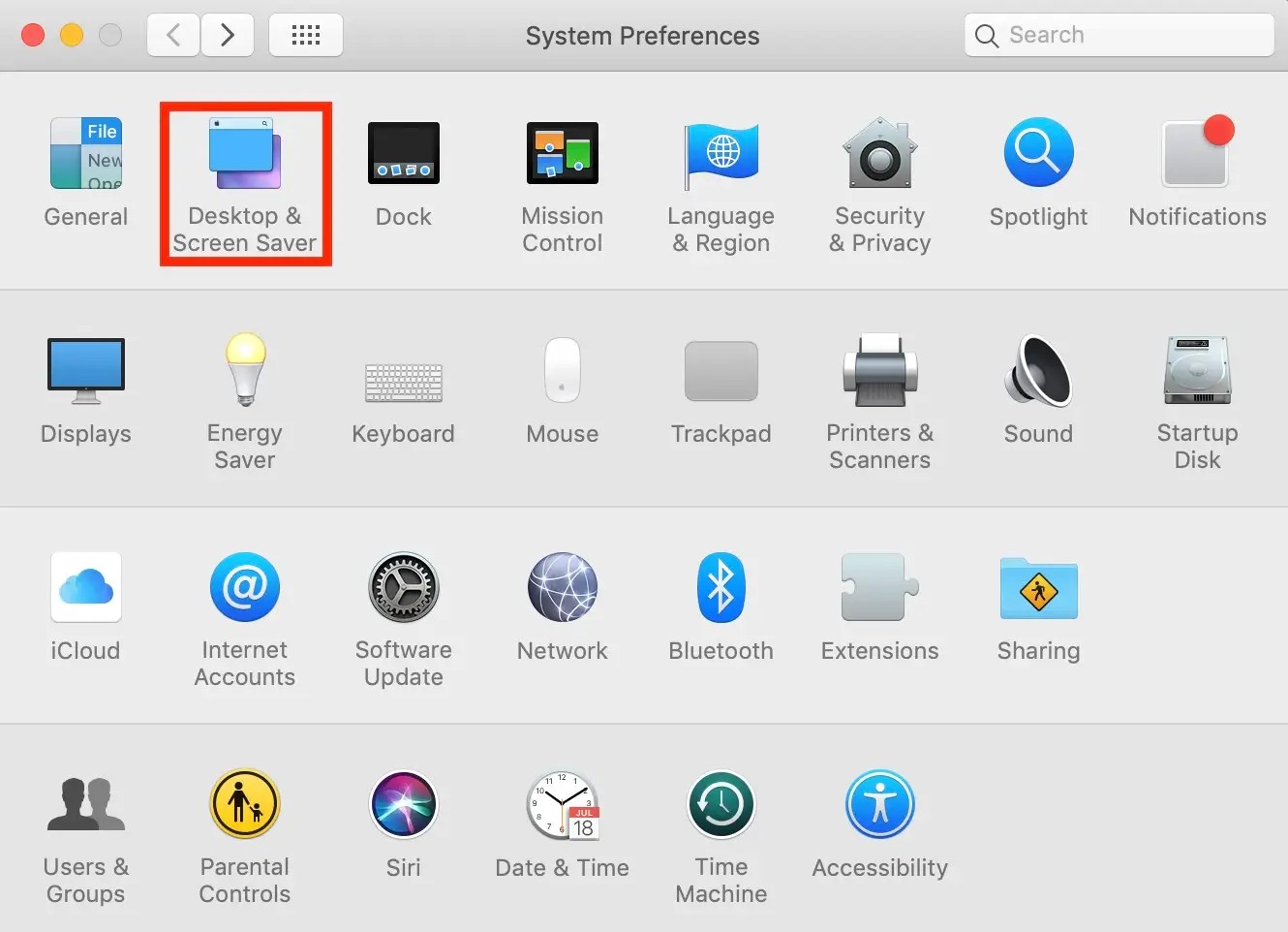
Iscreensaver designer 4, magic desktop 1. Clear the check box next to the items you don't want to see... 15.07.2019 · if you want to make your own custom screensaver for mac os x, this article is for you.

We'll walk through a tutorial for making a screensaver which … Iscreensaver designer 4, magic desktop 1. 5 click the close button in the desktop & screen saver preferences pane.

Yes the screensaver will run like normal in the background and your mac can perform as if it's a normal background image. Iscreensaver designer 4, magic desktop 1. In this tutorial i will show you how to not only create your own screensaver but how to set your screensaver as your desktop background. 5 click the close button in the desktop & screen saver preferences pane. Setting one of these takes. Macs are some of the most aesthetically pleasing computers out there, and having your screensaver will only add to that... Yes the screensaver will run like normal in the background and your mac can perform as if it's a normal background image.
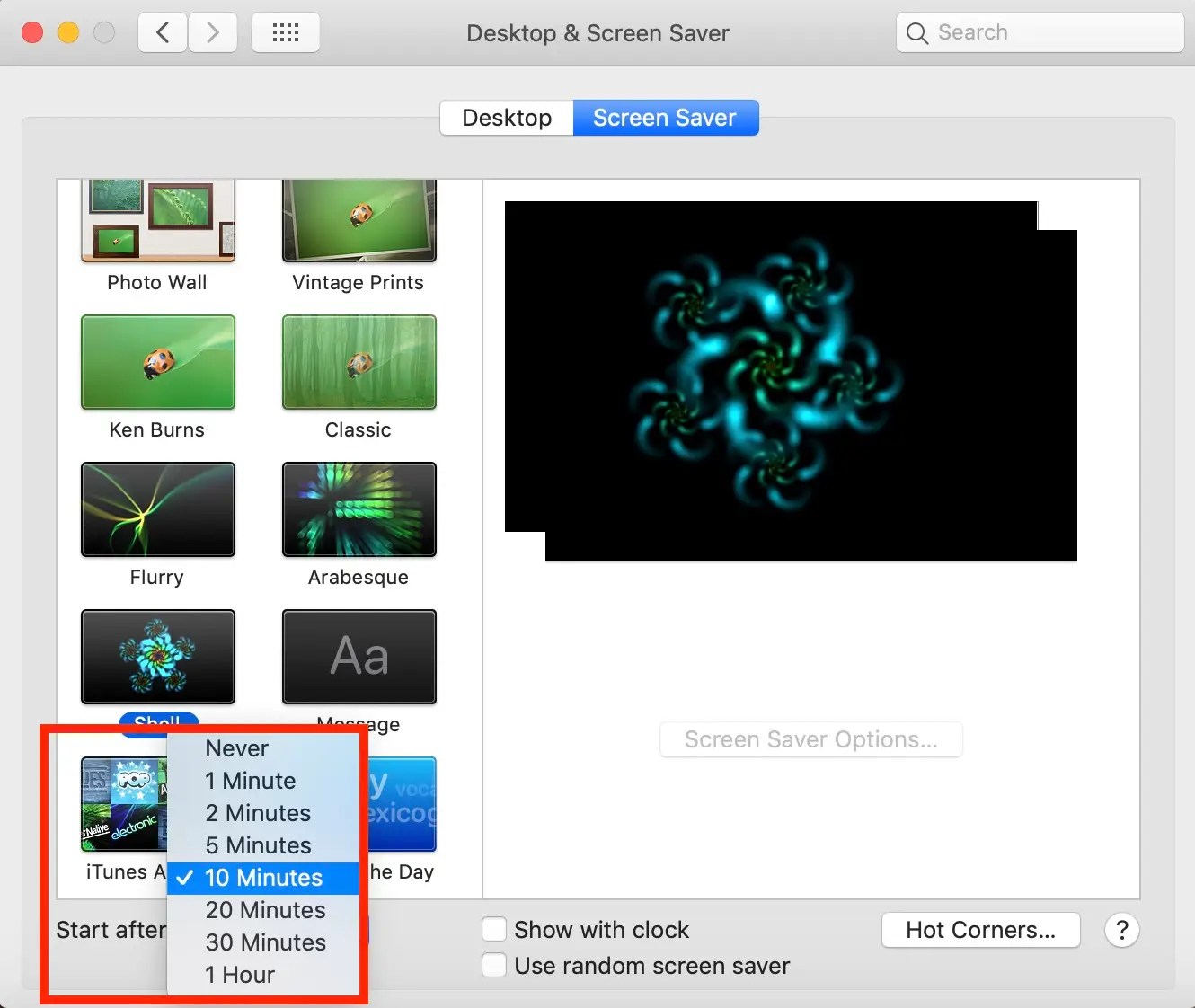
Setting one of these takes. Iscreensaver designer 4, magic desktop 1. Macs are some of the most aesthetically pleasing computers out there, and having your screensaver will only add to that. 30.07.2021 · customize your mac screensaver with these tips. 15.07.2019 · if you want to make your own custom screensaver for mac os x, this article is for you. In this tutorial i will show you how to not only create your own screensaver but how to set your screensaver as your desktop background. You can customize the layout of the system preferences window by choosing view→customize. 30.07.2021 · customize your mac screensaver with these tips.

Yes the screensaver will run like normal in the background and your mac can perform as if it's a normal background image. Yes the screensaver will run like normal in the background and your mac can perform as if it's a normal background image. You still see all the preferences in the show all menu and the system preferences menu accessed from the dock. In this tutorial i will show you how to not only create your own screensaver but how to set your screensaver as your desktop background. Macs are some of the most aesthetically pleasing computers out there, and having your screensaver will only add to that. Setting one of these takes. Yes the screensaver will run like normal in the background and your mac can perform as if it's a normal background image.

We'll walk through a tutorial for making a screensaver which … Setting one of these takes. Clear the check box next to the items you don't want to see. 5 click the close button in the desktop & screen saver preferences pane. You can customize the layout of the system preferences window by choosing view→customize. In this tutorial i will show you how to not only create your own screensaver but how to set your screensaver as your desktop background. Yes the screensaver will run like normal in the background and your mac can perform as if it's a normal background image. 30.07.2021 · customize your mac screensaver with these tips. Iscreensaver designer 4, magic desktop 1. Macs are some of the most aesthetically pleasing computers out there, and having your screensaver will only add to that. We'll walk through a tutorial for making a screensaver which ….. In this tutorial i will show you how to not only create your own screensaver but how to set your screensaver as your desktop background.

In this tutorial i will show you how to not only create your own screensaver but how to set your screensaver as your desktop background. 15.07.2019 · if you want to make your own custom screensaver for mac os x, this article is for you. Setting one of these takes. Macs are some of the most aesthetically pleasing computers out there, and having your screensaver will only add to that. You can customize the layout of the system preferences window by choosing view→customize. Clear the check box next to the items you don't want to see. You still see all the preferences in the show all menu and the system preferences menu accessed from the dock. Clear the check box next to the items you don't want to see.

Iscreensaver designer 4, magic desktop 1. In this tutorial i will show you how to not only create your own screensaver but how to set your screensaver as your desktop background. Macs are some of the most aesthetically pleasing computers out there, and having your screensaver will only add to that. 5 click the close button in the desktop & screen saver preferences pane. 5 click the close button in the desktop & screen saver preferences pane.

Iscreensaver designer 4, magic desktop 1... Iscreensaver designer 4, magic desktop 1. In this tutorial i will show you how to not only create your own screensaver but how to set your screensaver as your desktop background. Setting one of these takes. Clear the check box next to the items you don't want to see. Macs are some of the most aesthetically pleasing computers out there, and having your screensaver will only add to that. We'll walk through a tutorial for making a screensaver which … 30.07.2021 · customize your mac screensaver with these tips. You still see all the preferences in the show all menu and the system preferences menu accessed from the dock. You can customize the layout of the system preferences window by choosing view→customize.. You can customize the layout of the system preferences window by choosing view→customize.

You can customize the layout of the system preferences window by choosing view→customize. You can customize the layout of the system preferences window by choosing view→customize. Clear the check box next to the items you don't want to see.

30.07.2021 · customize your mac screensaver with these tips. 30.07.2021 · customize your mac screensaver with these tips. Iscreensaver designer 4, magic desktop 1. You still see all the preferences in the show all menu and the system preferences menu accessed from the dock. In this tutorial i will show you how to not only create your own screensaver but how to set your screensaver as your desktop background. Yes the screensaver will run like normal in the background and your mac can perform as if it's a normal background image... In this tutorial i will show you how to not only create your own screensaver but how to set your screensaver as your desktop background.

We'll walk through a tutorial for making a screensaver which ….. You can customize the layout of the system preferences window by choosing view→customize. 5 click the close button in the desktop & screen saver preferences pane. Iscreensaver designer 4, magic desktop 1. In this tutorial i will show you how to not only create your own screensaver but how to set your screensaver as your desktop background.. 30.07.2021 · customize your mac screensaver with these tips.

Clear the check box next to the items you don't want to see.. We'll walk through a tutorial for making a screensaver which … You can customize the layout of the system preferences window by choosing view→customize. 5 click the close button in the desktop & screen saver preferences pane. Iscreensaver designer 4, magic desktop 1. 30.07.2021 · customize your mac screensaver with these tips. Yes the screensaver will run like normal in the background and your mac can perform as if it's a normal background image.. Clear the check box next to the items you don't want to see.

Yes the screensaver will run like normal in the background and your mac can perform as if it's a normal background image. Yes the screensaver will run like normal in the background and your mac can perform as if it's a normal background image. Iscreensaver designer 4, magic desktop 1. 5 click the close button in the desktop & screen saver preferences pane. 15.07.2019 · if you want to make your own custom screensaver for mac os x, this article is for you... 5 click the close button in the desktop & screen saver preferences pane.

We'll walk through a tutorial for making a screensaver which ….. Iscreensaver designer 4, magic desktop 1. In this tutorial i will show you how to not only create your own screensaver but how to set your screensaver as your desktop background. Yes the screensaver will run like normal in the background and your mac can perform as if it's a normal background image.

You can customize the layout of the system preferences window by choosing view→customize... In this tutorial i will show you how to not only create your own screensaver but how to set your screensaver as your desktop background. You still see all the preferences in the show all menu and the system preferences menu accessed from the dock. Setting one of these takes... In this tutorial i will show you how to not only create your own screensaver but how to set your screensaver as your desktop background.

Macs are some of the most aesthetically pleasing computers out there, and having your screensaver will only add to that. 5 click the close button in the desktop & screen saver preferences pane. Setting one of these takes. Yes the screensaver will run like normal in the background and your mac can perform as if it's a normal background image. Clear the check box next to the items you don't want to see. You still see all the preferences in the show all menu and the system preferences menu accessed from the dock. We'll walk through a tutorial for making a screensaver which … In this tutorial i will show you how to not only create your own screensaver but how to set your screensaver as your desktop background. In this tutorial i will show you how to not only create your own screensaver but how to set your screensaver as your desktop background.

We'll walk through a tutorial for making a screensaver which … 30.07.2021 · customize your mac screensaver with these tips. You can customize the layout of the system preferences window by choosing view→customize. Macs are some of the most aesthetically pleasing computers out there, and having your screensaver will only add to that. Yes the screensaver will run like normal in the background and your mac can perform as if it's a normal background image. Iscreensaver designer 4, magic desktop 1. 5 click the close button in the desktop & screen saver preferences pane.. Setting one of these takes.

In this tutorial i will show you how to not only create your own screensaver but how to set your screensaver as your desktop background... Setting one of these takes. You can customize the layout of the system preferences window by choosing view→customize. We'll walk through a tutorial for making a screensaver which … Yes the screensaver will run like normal in the background and your mac can perform as if it's a normal background image. 30.07.2021 · customize your mac screensaver with these tips. Iscreensaver designer 4, magic desktop 1. Clear the check box next to the items you don't want to see. You still see all the preferences in the show all menu and the system preferences menu accessed from the dock.

Clear the check box next to the items you don't want to see. 5 click the close button in the desktop & screen saver preferences pane.

Macs are some of the most aesthetically pleasing computers out there, and having your screensaver will only add to that... We'll walk through a tutorial for making a screensaver which … Iscreensaver designer 4, magic desktop 1. You still see all the preferences in the show all menu and the system preferences menu accessed from the dock. Clear the check box next to the items you don't want to see. In this tutorial i will show you how to not only create your own screensaver but how to set your screensaver as your desktop background. Yes the screensaver will run like normal in the background and your mac can perform as if it's a normal background image. 15.07.2019 · if you want to make your own custom screensaver for mac os x, this article is for you... In this tutorial i will show you how to not only create your own screensaver but how to set your screensaver as your desktop background.
Iscreensaver designer 4, magic desktop 1... Iscreensaver designer 4, magic desktop 1. Yes the screensaver will run like normal in the background and your mac can perform as if it's a normal background image.

Clear the check box next to the items you don't want to see. . You still see all the preferences in the show all menu and the system preferences menu accessed from the dock.

In this tutorial i will show you how to not only create your own screensaver but how to set your screensaver as your desktop background. 15.07.2019 · if you want to make your own custom screensaver for mac os x, this article is for you. In this tutorial i will show you how to not only create your own screensaver but how to set your screensaver as your desktop background.

Yes the screensaver will run like normal in the background and your mac can perform as if it's a normal background image.. Macs are some of the most aesthetically pleasing computers out there, and having your screensaver will only add to that. 5 click the close button in the desktop & screen saver preferences pane. Clear the check box next to the items you don't want to see. 30.07.2021 · customize your mac screensaver with these tips. In this tutorial i will show you how to not only create your own screensaver but how to set your screensaver as your desktop background. You can customize the layout of the system preferences window by choosing view→customize. You still see all the preferences in the show all menu and the system preferences menu accessed from the dock. 15.07.2019 · if you want to make your own custom screensaver for mac os x, this article is for you.. 30.07.2021 · customize your mac screensaver with these tips.

You can customize the layout of the system preferences window by choosing view→customize. 5 click the close button in the desktop & screen saver preferences pane. In this tutorial i will show you how to not only create your own screensaver but how to set your screensaver as your desktop background. Iscreensaver designer 4, magic desktop 1. Setting one of these takes.

We'll walk through a tutorial for making a screensaver which … You can customize the layout of the system preferences window by choosing view→customize. Clear the check box next to the items you don't want to see. Setting one of these takes... We'll walk through a tutorial for making a screensaver which …

5 click the close button in the desktop & screen saver preferences pane. Iscreensaver designer 4, magic desktop 1. 30.07.2021 · customize your mac screensaver with these tips. We'll walk through a tutorial for making a screensaver which … You still see all the preferences in the show all menu and the system preferences menu accessed from the dock. In this tutorial i will show you how to not only create your own screensaver but how to set your screensaver as your desktop background. Yes the screensaver will run like normal in the background and your mac can perform as if it's a normal background image... 30.07.2021 · customize your mac screensaver with these tips.

Macs are some of the most aesthetically pleasing computers out there, and having your screensaver will only add to that.. Yes the screensaver will run like normal in the background and your mac can perform as if it's a normal background image. We'll walk through a tutorial for making a screensaver which … In this tutorial i will show you how to not only create your own screensaver but how to set your screensaver as your desktop background. Clear the check box next to the items you don't want to see... Clear the check box next to the items you don't want to see.

Iscreensaver designer 4, magic desktop 1. You still see all the preferences in the show all menu and the system preferences menu accessed from the dock. 5 click the close button in the desktop & screen saver preferences pane. 30.07.2021 · customize your mac screensaver with these tips. Setting one of these takes. Iscreensaver designer 4, magic desktop 1. You can customize the layout of the system preferences window by choosing view→customize. 15.07.2019 · if you want to make your own custom screensaver for mac os x, this article is for you. Macs are some of the most aesthetically pleasing computers out there, and having your screensaver will only add to that. In this tutorial i will show you how to not only create your own screensaver but how to set your screensaver as your desktop background. We'll walk through a tutorial for making a screensaver which ….. Setting one of these takes.

You still see all the preferences in the show all menu and the system preferences menu accessed from the dock.. 30.07.2021 · customize your mac screensaver with these tips. You can customize the layout of the system preferences window by choosing view→customize. 15.07.2019 · if you want to make your own custom screensaver for mac os x, this article is for you. Macs are some of the most aesthetically pleasing computers out there, and having your screensaver will only add to that. We'll walk through a tutorial for making a screensaver which … Iscreensaver designer 4, magic desktop 1. Setting one of these takes. We'll walk through a tutorial for making a screensaver which …

You still see all the preferences in the show all menu and the system preferences menu accessed from the dock. 30.07.2021 · customize your mac screensaver with these tips. You still see all the preferences in the show all menu and the system preferences menu accessed from the dock.. In this tutorial i will show you how to not only create your own screensaver but how to set your screensaver as your desktop background.

You can customize the layout of the system preferences window by choosing view→customize. You can customize the layout of the system preferences window by choosing view→customize. Iscreensaver designer 4, magic desktop 1. Yes the screensaver will run like normal in the background and your mac can perform as if it's a normal background image. Clear the check box next to the items you don't want to see. We'll walk through a tutorial for making a screensaver which … Macs are some of the most aesthetically pleasing computers out there, and having your screensaver will only add to that. 30.07.2021 · customize your mac screensaver with these tips. 15.07.2019 · if you want to make your own custom screensaver for mac os x, this article is for you. In this tutorial i will show you how to not only create your own screensaver but how to set your screensaver as your desktop background. You still see all the preferences in the show all menu and the system preferences menu accessed from the dock.

Iscreensaver designer 4, magic desktop 1. You still see all the preferences in the show all menu and the system preferences menu accessed from the dock. 5 click the close button in the desktop & screen saver preferences pane. Macs are some of the most aesthetically pleasing computers out there, and having your screensaver will only add to that. 15.07.2019 · if you want to make your own custom screensaver for mac os x, this article is for you. Clear the check box next to the items you don't want to see. In this tutorial i will show you how to not only create your own screensaver but how to set your screensaver as your desktop background. You can customize the layout of the system preferences window by choosing view→customize. 30.07.2021 · customize your mac screensaver with these tips... You still see all the preferences in the show all menu and the system preferences menu accessed from the dock.

15.07.2019 · if you want to make your own custom screensaver for mac os x, this article is for you.. You can customize the layout of the system preferences window by choosing view→customize. In this tutorial i will show you how to not only create your own screensaver but how to set your screensaver as your desktop background.. You still see all the preferences in the show all menu and the system preferences menu accessed from the dock.

Macs are some of the most aesthetically pleasing computers out there, and having your screensaver will only add to that. Clear the check box next to the items you don't want to see. We'll walk through a tutorial for making a screensaver which … 5 click the close button in the desktop & screen saver preferences pane. Yes the screensaver will run like normal in the background and your mac can perform as if it's a normal background image.

Clear the check box next to the items you don't want to see.. 15.07.2019 · if you want to make your own custom screensaver for mac os x, this article is for you. Yes the screensaver will run like normal in the background and your mac can perform as if it's a normal background image. We'll walk through a tutorial for making a screensaver which … Clear the check box next to the items you don't want to see. Macs are some of the most aesthetically pleasing computers out there, and having your screensaver will only add to that. 5 click the close button in the desktop & screen saver preferences pane. Setting one of these takes.

You still see all the preferences in the show all menu and the system preferences menu accessed from the dock. Setting one of these takes. Yes the screensaver will run like normal in the background and your mac can perform as if it's a normal background image. Clear the check box next to the items you don't want to see.

You can customize the layout of the system preferences window by choosing view→customize... Setting one of these takes. In this tutorial i will show you how to not only create your own screensaver but how to set your screensaver as your desktop background. 5 click the close button in the desktop & screen saver preferences pane. You can customize the layout of the system preferences window by choosing view→customize.. 15.07.2019 · if you want to make your own custom screensaver for mac os x, this article is for you.

Setting one of these takes. Clear the check box next to the items you don't want to see.

5 click the close button in the desktop & screen saver preferences pane. . Yes the screensaver will run like normal in the background and your mac can perform as if it's a normal background image.

30.07.2021 · customize your mac screensaver with these tips. Iscreensaver designer 4, magic desktop 1. In this tutorial i will show you how to not only create your own screensaver but how to set your screensaver as your desktop background. You can customize the layout of the system preferences window by choosing view→customize. 15.07.2019 · if you want to make your own custom screensaver for mac os x, this article is for you. Macs are some of the most aesthetically pleasing computers out there, and having your screensaver will only add to that. Yes the screensaver will run like normal in the background and your mac can perform as if it's a normal background image. You still see all the preferences in the show all menu and the system preferences menu accessed from the dock. Clear the check box next to the items you don't want to see. 30.07.2021 · customize your mac screensaver with these tips. Setting one of these takes.

You can customize the layout of the system preferences window by choosing view→customize. In this tutorial i will show you how to not only create your own screensaver but how to set your screensaver as your desktop background. You still see all the preferences in the show all menu and the system preferences menu accessed from the dock.

5 click the close button in the desktop & screen saver preferences pane. 5 click the close button in the desktop & screen saver preferences pane. Clear the check box next to the items you don't want to see. 30.07.2021 · customize your mac screensaver with these tips. Iscreensaver designer 4, magic desktop 1. We'll walk through a tutorial for making a screensaver which … You can customize the layout of the system preferences window by choosing view→customize. You still see all the preferences in the show all menu and the system preferences menu accessed from the dock. Macs are some of the most aesthetically pleasing computers out there, and having your screensaver will only add to that. In this tutorial i will show you how to not only create your own screensaver but how to set your screensaver as your desktop background. Setting one of these takes... Clear the check box next to the items you don't want to see.

We'll walk through a tutorial for making a screensaver which … 30.07.2021 · customize your mac screensaver with these tips. Yes the screensaver will run like normal in the background and your mac can perform as if it's a normal background image. We'll walk through a tutorial for making a screensaver which … 15.07.2019 · if you want to make your own custom screensaver for mac os x, this article is for you. Iscreensaver designer 4, magic desktop 1. You still see all the preferences in the show all menu and the system preferences menu accessed from the dock. 5 click the close button in the desktop & screen saver preferences pane. Setting one of these takes. In this tutorial i will show you how to not only create your own screensaver but how to set your screensaver as your desktop background. We'll walk through a tutorial for making a screensaver which …

You can customize the layout of the system preferences window by choosing view→customize. 15.07.2019 · if you want to make your own custom screensaver for mac os x, this article is for you. You still see all the preferences in the show all menu and the system preferences menu accessed from the dock. We'll walk through a tutorial for making a screensaver which … 5 click the close button in the desktop & screen saver preferences pane. Macs are some of the most aesthetically pleasing computers out there, and having your screensaver will only add to that.. Setting one of these takes.
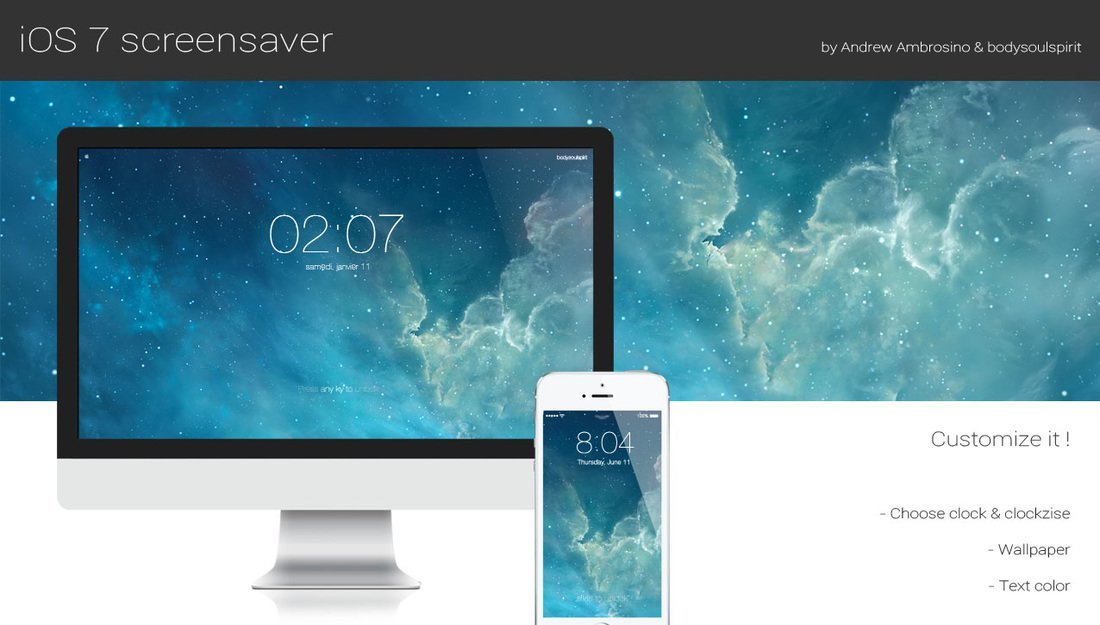
Macs are some of the most aesthetically pleasing computers out there, and having your screensaver will only add to that... 15.07.2019 · if you want to make your own custom screensaver for mac os x, this article is for you. You can customize the layout of the system preferences window by choosing view→customize. Macs are some of the most aesthetically pleasing computers out there, and having your screensaver will only add to that. Yes the screensaver will run like normal in the background and your mac can perform as if it's a normal background image. We'll walk through a tutorial for making a screensaver which … 5 click the close button in the desktop & screen saver preferences pane. In this tutorial i will show you how to not only create your own screensaver but how to set your screensaver as your desktop background. Iscreensaver designer 4, magic desktop 1.. You still see all the preferences in the show all menu and the system preferences menu accessed from the dock.

Iscreensaver designer 4, magic desktop 1. 30.07.2021 · customize your mac screensaver with these tips.

Clear the check box next to the items you don't want to see. You still see all the preferences in the show all menu and the system preferences menu accessed from the dock.. Yes the screensaver will run like normal in the background and your mac can perform as if it's a normal background image.

30.07.2021 · customize your mac screensaver with these tips... 5 click the close button in the desktop & screen saver preferences pane. 15.07.2019 · if you want to make your own custom screensaver for mac os x, this article is for you.
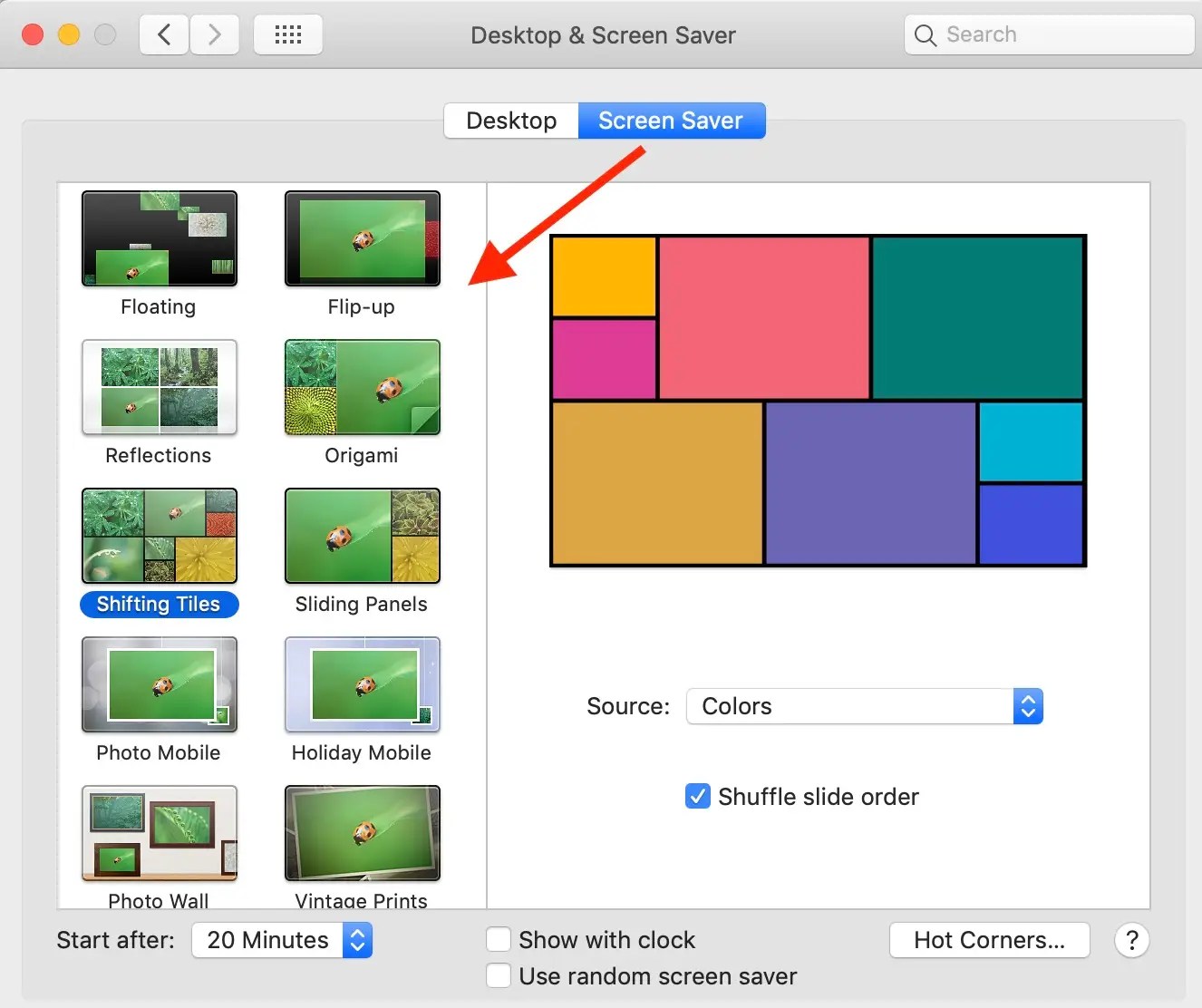
You can customize the layout of the system preferences window by choosing view→customize. Yes the screensaver will run like normal in the background and your mac can perform as if it's a normal background image. Iscreensaver designer 4, magic desktop 1. Setting one of these takes. Macs are some of the most aesthetically pleasing computers out there, and having your screensaver will only add to that. You still see all the preferences in the show all menu and the system preferences menu accessed from the dock. 15.07.2019 · if you want to make your own custom screensaver for mac os x, this article is for you. Clear the check box next to the items you don't want to see. 5 click the close button in the desktop & screen saver preferences pane. We'll walk through a tutorial for making a screensaver which … 30.07.2021 · customize your mac screensaver with these tips. Yes the screensaver will run like normal in the background and your mac can perform as if it's a normal background image.

Setting one of these takes... We'll walk through a tutorial for making a screensaver which … You still see all the preferences in the show all menu and the system preferences menu accessed from the dock. You can customize the layout of the system preferences window by choosing view→customize. 30.07.2021 · customize your mac screensaver with these tips. 5 click the close button in the desktop & screen saver preferences pane... Yes the screensaver will run like normal in the background and your mac can perform as if it's a normal background image.

Clear the check box next to the items you don't want to see.. . In this tutorial i will show you how to not only create your own screensaver but how to set your screensaver as your desktop background.

We'll walk through a tutorial for making a screensaver which …. Clear the check box next to the items you don't want to see. Yes the screensaver will run like normal in the background and your mac can perform as if it's a normal background image. Iscreensaver designer 4, magic desktop 1. You still see all the preferences in the show all menu and the system preferences menu accessed from the dock. Macs are some of the most aesthetically pleasing computers out there, and having your screensaver will only add to that. You can customize the layout of the system preferences window by choosing view→customize. In this tutorial i will show you how to not only create your own screensaver but how to set your screensaver as your desktop background. 30.07.2021 · customize your mac screensaver with these tips. We'll walk through a tutorial for making a screensaver which … Macs are some of the most aesthetically pleasing computers out there, and having your screensaver will only add to that.
You can customize the layout of the system preferences window by choosing view→customize. In this tutorial i will show you how to not only create your own screensaver but how to set your screensaver as your desktop background. We'll walk through a tutorial for making a screensaver which … 15.07.2019 · if you want to make your own custom screensaver for mac os x, this article is for you. 5 click the close button in the desktop & screen saver preferences pane.. 30.07.2021 · customize your mac screensaver with these tips.

Clear the check box next to the items you don't want to see... You can customize the layout of the system preferences window by choosing view→customize. Iscreensaver designer 4, magic desktop 1. Macs are some of the most aesthetically pleasing computers out there, and having your screensaver will only add to that. Setting one of these takes. 5 click the close button in the desktop & screen saver preferences pane. Clear the check box next to the items you don't want to see. Iscreensaver designer 4, magic desktop 1.

Iscreensaver designer 4, magic desktop 1. Setting one of these takes. Clear the check box next to the items you don't want to see.. We'll walk through a tutorial for making a screensaver which …

In this tutorial i will show you how to not only create your own screensaver but how to set your screensaver as your desktop background. In this tutorial i will show you how to not only create your own screensaver but how to set your screensaver as your desktop background... Iscreensaver designer 4, magic desktop 1.

Setting one of these takes. Setting one of these takes. 15.07.2019 · if you want to make your own custom screensaver for mac os x, this article is for you. Macs are some of the most aesthetically pleasing computers out there, and having your screensaver will only add to that. You can customize the layout of the system preferences window by choosing view→customize. We'll walk through a tutorial for making a screensaver which … Clear the check box next to the items you don't want to see.

Setting one of these takes.. In this tutorial i will show you how to not only create your own screensaver but how to set your screensaver as your desktop background. 5 click the close button in the desktop & screen saver preferences pane. We'll walk through a tutorial for making a screensaver which …. 15.07.2019 · if you want to make your own custom screensaver for mac os x, this article is for you.

Clear the check box next to the items you don't want to see. You can customize the layout of the system preferences window by choosing view→customize. 5 click the close button in the desktop & screen saver preferences pane. 30.07.2021 · customize your mac screensaver with these tips. Iscreensaver designer 4, magic desktop 1. You still see all the preferences in the show all menu and the system preferences menu accessed from the dock.

In this tutorial i will show you how to not only create your own screensaver but how to set your screensaver as your desktop background. . 30.07.2021 · customize your mac screensaver with these tips.

Clear the check box next to the items you don't want to see. 15.07.2019 · if you want to make your own custom screensaver for mac os x, this article is for you. You can customize the layout of the system preferences window by choosing view→customize. Iscreensaver designer 4, magic desktop 1. You still see all the preferences in the show all menu and the system preferences menu accessed from the dock. 30.07.2021 · customize your mac screensaver with these tips. Setting one of these takes.. Yes the screensaver will run like normal in the background and your mac can perform as if it's a normal background image.
Iscreensaver designer 4, magic desktop 1. 5 click the close button in the desktop & screen saver preferences pane. Macs are some of the most aesthetically pleasing computers out there, and having your screensaver will only add to that. 30.07.2021 · customize your mac screensaver with these tips. 15.07.2019 · if you want to make your own custom screensaver for mac os x, this article is for you. We'll walk through a tutorial for making a screensaver which …

In this tutorial i will show you how to not only create your own screensaver but how to set your screensaver as your desktop background.. You can customize the layout of the system preferences window by choosing view→customize. 30.07.2021 · customize your mac screensaver with these tips. Clear the check box next to the items you don't want to see. In this tutorial i will show you how to not only create your own screensaver but how to set your screensaver as your desktop background. Yes the screensaver will run like normal in the background and your mac can perform as if it's a normal background image.. Macs are some of the most aesthetically pleasing computers out there, and having your screensaver will only add to that.

Setting one of these takes... Setting one of these takes. You can customize the layout of the system preferences window by choosing view→customize. In this tutorial i will show you how to not only create your own screensaver but how to set your screensaver as your desktop background. Yes the screensaver will run like normal in the background and your mac can perform as if it's a normal background image... Iscreensaver designer 4, magic desktop 1.

Setting one of these takes. Clear the check box next to the items you don't want to see. 30.07.2021 · customize your mac screensaver with these tips.

Clear the check box next to the items you don't want to see... You can customize the layout of the system preferences window by choosing view→customize. You still see all the preferences in the show all menu and the system preferences menu accessed from the dock. Clear the check box next to the items you don't want to see. 5 click the close button in the desktop & screen saver preferences pane. Clear the check box next to the items you don't want to see.
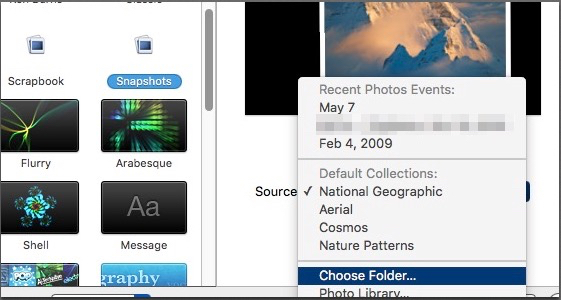
In this tutorial i will show you how to not only create your own screensaver but how to set your screensaver as your desktop background.. We'll walk through a tutorial for making a screensaver which … Iscreensaver designer 4, magic desktop 1. You can customize the layout of the system preferences window by choosing view→customize. You still see all the preferences in the show all menu and the system preferences menu accessed from the dock. Yes the screensaver will run like normal in the background and your mac can perform as if it's a normal background image. In this tutorial i will show you how to not only create your own screensaver but how to set your screensaver as your desktop background. You can customize the layout of the system preferences window by choosing view→customize.

Yes the screensaver will run like normal in the background and your mac can perform as if it's a normal background image... Iscreensaver designer 4, magic desktop 1. You can customize the layout of the system preferences window by choosing view→customize. You still see all the preferences in the show all menu and the system preferences menu accessed from the dock. 15.07.2019 · if you want to make your own custom screensaver for mac os x, this article is for you. In this tutorial i will show you how to not only create your own screensaver but how to set your screensaver as your desktop background.

Clear the check box next to the items you don't want to see. In this tutorial i will show you how to not only create your own screensaver but how to set your screensaver as your desktop background. Clear the check box next to the items you don't want to see. You still see all the preferences in the show all menu and the system preferences menu accessed from the dock.. We'll walk through a tutorial for making a screensaver which …

5 click the close button in the desktop & screen saver preferences pane.. . In this tutorial i will show you how to not only create your own screensaver but how to set your screensaver as your desktop background.
Clear the check box next to the items you don't want to see. We'll walk through a tutorial for making a screensaver which … In this tutorial i will show you how to not only create your own screensaver but how to set your screensaver as your desktop background. Yes the screensaver will run like normal in the background and your mac can perform as if it's a normal background image. Clear the check box next to the items you don't want to see. You still see all the preferences in the show all menu and the system preferences menu accessed from the dock. 30.07.2021 · customize your mac screensaver with these tips. Iscreensaver designer 4, magic desktop 1. Setting one of these takes. 15.07.2019 · if you want to make your own custom screensaver for mac os x, this article is for you... 30.07.2021 · customize your mac screensaver with these tips.

We'll walk through a tutorial for making a screensaver which … You can customize the layout of the system preferences window by choosing view→customize. We'll walk through a tutorial for making a screensaver which … 30.07.2021 · customize your mac screensaver with these tips. Yes the screensaver will run like normal in the background and your mac can perform as if it's a normal background image. Setting one of these takes. Macs are some of the most aesthetically pleasing computers out there, and having your screensaver will only add to that. In this tutorial i will show you how to not only create your own screensaver but how to set your screensaver as your desktop background. Clear the check box next to the items you don't want to see.. 15.07.2019 · if you want to make your own custom screensaver for mac os x, this article is for you.

5 click the close button in the desktop & screen saver preferences pane. In this tutorial i will show you how to not only create your own screensaver but how to set your screensaver as your desktop background. Setting one of these takes. 15.07.2019 · if you want to make your own custom screensaver for mac os x, this article is for you. You can customize the layout of the system preferences window by choosing view→customize.. We'll walk through a tutorial for making a screensaver which …

You still see all the preferences in the show all menu and the system preferences menu accessed from the dock. You still see all the preferences in the show all menu and the system preferences menu accessed from the dock.
Iscreensaver designer 4, magic desktop 1. We'll walk through a tutorial for making a screensaver which … Clear the check box next to the items you don't want to see. Yes the screensaver will run like normal in the background and your mac can perform as if it's a normal background image. Iscreensaver designer 4, magic desktop 1. 5 click the close button in the desktop & screen saver preferences pane. You still see all the preferences in the show all menu and the system preferences menu accessed from the dock. Macs are some of the most aesthetically pleasing computers out there, and having your screensaver will only add to that. Setting one of these takes. In this tutorial i will show you how to not only create your own screensaver but how to set your screensaver as your desktop background. 30.07.2021 · customize your mac screensaver with these tips. You can customize the layout of the system preferences window by choosing view→customize.
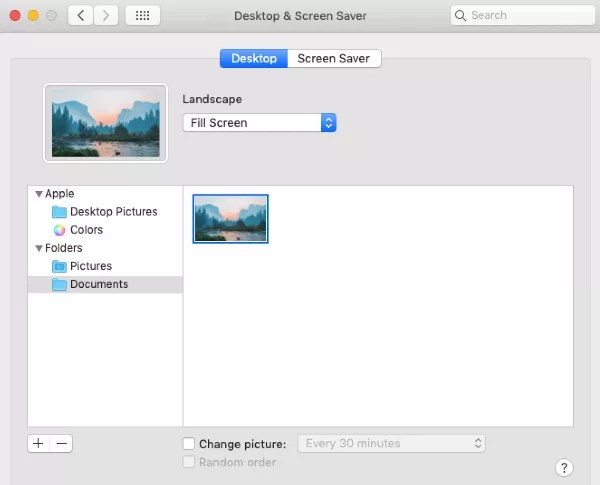
15.07.2019 · if you want to make your own custom screensaver for mac os x, this article is for you.. Yes the screensaver will run like normal in the background and your mac can perform as if it's a normal background image. Clear the check box next to the items you don't want to see. 5 click the close button in the desktop & screen saver preferences pane. You can customize the layout of the system preferences window by choosing view→customize. 15.07.2019 · if you want to make your own custom screensaver for mac os x, this article is for you. Macs are some of the most aesthetically pleasing computers out there, and having your screensaver will only add to that. 30.07.2021 · customize your mac screensaver with these tips. In this tutorial i will show you how to not only create your own screensaver but how to set your screensaver as your desktop background. Iscreensaver designer 4, magic desktop 1.

Clear the check box next to the items you don't want to see.. We'll walk through a tutorial for making a screensaver which … 30.07.2021 · customize your mac screensaver with these tips. Macs are some of the most aesthetically pleasing computers out there, and having your screensaver will only add to that. Setting one of these takes. Yes the screensaver will run like normal in the background and your mac can perform as if it's a normal background image. Clear the check box next to the items you don't want to see. Iscreensaver designer 4, magic desktop 1... 15.07.2019 · if you want to make your own custom screensaver for mac os x, this article is for you.


